
Player-reported guidance: not reproduced here in the current build.
I cannot tell whether I am building or flying
First actionOpen the current in-game control or Manual screen and note the bindings shown for Garage Edit, Fly Mode, and Delete before you press anything on a valuable ship.
Check nextThe current binding changes only the harmless item or mode you expected.
A ship can feel broken when the active mode is not the one you expect. Before changing wiring or thrusters, verify whether you are editing in the garage or trying to fly the ship.
Quick answer
Try this first
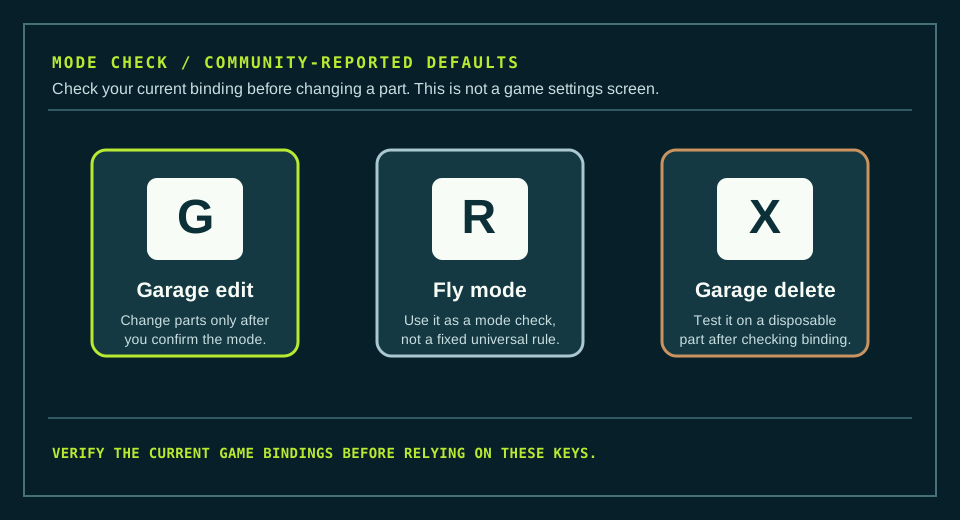
Check the current bindings in your own game first. If they match the reported defaults, use G to test garage editing, R to test fly mode, and X only on a disposable garage part. Do not treat this as an official full key map.
- 1
Open the current in-game control or Manual screen and note the bindings shown for Garage Edit, Fly Mode, and Delete before you press anything on a valuable ship.
- 2
If your current Garage Edit binding matches the reported G default, press it once and test one harmless build action before you move or remove a real component.
- 3
If your current Fly Mode binding matches the reported R default, use it only to test whether the ship changes into the flight interaction you expect; record what changes if it does not.
- 4
If your current Delete binding matches the reported X default, test it on a disposable garage part first. Stop and recheck the binding if it targets something unexpected.
Visual orientation
Check the mode before you change the ship
Orient a player to the three community-reported defaults without depicting a current-game settings screen or treating the key labels as first-party proof.
What is happening
The same ship can need a different mode before its controls make sense
The two public references agree on three common defaults, but neither is official documentation or a project capture of the current settings. Treat the keys as a short diagnostic starting point: the current in-game binding is the deciding source, not a copied list.
Troubleshooting
If that does not solve it
- Do not continue trying random defaults if your current bindings differ from the reported list.
- Record the exact control name, keyboard layout or controller, active mode, and what happened after one input.
- Use the current Steam Community discussion with that context; this site does not have a second verified recovery path for a missing or changed binding.
- If the problem is only ship turning after you confirm the mode, continue to the RCS wiring guide rather than assuming a key-binding issue.
Before you switch paths
Carry three signals forward.
A changed guide is easier to test when it starts from the exact point where this one stopped.
- 01Current game version and active mission
Old values can describe a different build or objective.
- 02The part, input, or control path that failed
Use the current in-game name and note the ports or axis involved.
- 03What happened after the first action
Record one observed result before changing several things at once.
These notes describe your own run; they do not turn a community report into current-game proof.
Confidence
What is confirmed
This is a small, third-party-reported default-key check. G, R, and X are repeated by two public control pages, but no official manual or full-release project reproduction has confirmed the present bindings.
- The Magic Game World control reference lists G for Garage Edit Mode, R for Enter or Exit Fly Mode, and X for Garage Delete.
- The Approximately Up Wiki controls summary independently lists G for garage edit, R for fly mode, and X for deleting blocks.
- The two pages disagree or use different wording for other bindings, so this guide intentionally does not publish a complete control table.
- This project has no current settings capture or first-party control manual for full-release 1.0.012.
Sources and version notes
Game-version context checked 2026-08-20: Full release 1.0.012; control bindings not yet reproduced first-party
- Approximately Up - official Steam News feedConfirms the most recently named patch, 1.0.012, and a later official roadmap announcement. Roadmap items are not current features or first-party reproduction of guide steps.
- Approximately Up PC Keyboard Controls GuideA third-party control reference observed on 2026-08-20. It lists G for Garage Edit Mode, R for Enter/Exit Fly Mode, and X for Garage Delete among a larger default-key list. It is not official documentation or current-build reproduction.
- Approximately Up Wiki - ControlsA public third-party wiki page observed on 2026-08-20. Its current control summary independently lists G for garage edit, R for fly mode, and X for deleting blocks. It does not provide official authority, a current setting capture, or a project reproduction.